The GenAI Guide: How to Actually Use AI (Without the Hype)
A plain-English, model-agnostic guide to using AI at work and in life. What an LLM is, why it's for you, how to pick and test models yourself, and the guardrails that keep you in charge.

Everyone’s either freaking out about AI or pretending it’ll blow over. Both are wrong.
I’m not an AI researcher. I was a nurse. Then I taught myself to build software with these tools, and somewhere along the way I became “the AI guy” at work. Not because I’m smart. Because I was curious for about three weekends while everyone else waited for permission.
Here’s what nobody tells you: the tools change every month, but the skill underneath doesn’t. You don’t need to chase the headlines. You need a way of thinking that survives them.
That’s what this is. Bookmark it. Come back to it. It’s built to still be true in three years.
You don’t need to become a prompt engineer. You don’t need to follow every launch. You need three things: a mental model that survives the next ten models, a way to test tools yourself, and the discipline to use the sword without dropping your own arm. That’s the whole guide. Everything below is detail.
What an LLM actually is, in plain English
Forget “neural networks” and “transformers” for a second. Here’s the only model you need.
An LLM is autocomplete that read the entire internet. That’s it. You give it some words, it predicts what words should come next, based on the staggering amount of text it’s seen. Your phone does a tiny version of this when it guesses your next word. An LLM does it with everything humans have ever written.
That’s the whole trick. It’s not thinking the way you think. It’s not looking facts up in a database. It’s predicting the most plausible next chunk of text, one piece at a time, faster than you can read.
Two words you’ll hear that are worth knowing, and only these two.
The context window is its short-term memory for this one conversation. Everything you’ve said in this chat, plus whatever you pasted in, lives there. It’s big but not infinite. When the conversation gets long, the early stuff can fall out the back, which is why a model sometimes “forgets” what you told it twenty messages ago.
The training data is everything it read before you showed up, frozen in time. It doesn’t know what happened after that cutoff unless you tell it or it can search. So when it sounds confident about recent events, double-check. It might be guessing from old patterns.
Now the one fact that explains almost everything weird about AI: it predicts, it doesn’t know. Because it’s generating plausible-sounding text instead of retrieving verified facts, it will sometimes make things up with total confidence. Wrong dates. Fake quotes. A book that doesn’t exist, attributed to an author who’s real. That’s not a bug they’ll patch away in the next version. It’s how the thing works. Remember that, and verification stops feeling like paranoia and starts feeling like common sense.
Once you get this, AI stops feeling like magic and starts feeling like a tool. Which is exactly what it is. A very, very good one.
Why this is for you, not just the tech people
“I’m not technical.” I hear this constantly. Usually from people who use Excel, Google Maps, and a banking app every day without blinking.
Let’s be real: you’ve learned harder tools than this. The whole point of these things is that you talk to them in plain English. There’s no syntax to memorize. No commands to look up. If you can write a text message, you can use the most powerful tool of your lifetime.
This isn’t for engineers and founders. It’s for the nurse charting at 2 a.m., the teacher building a lesson plan, the marketer who’s stuck on a headline, the person dreading one specific email all week. Whatever your job is, this multiplies it. The wins that hook people aren’t impressive. They’re small and real. Drafting the message you’ve been avoiding. Untangling a spreadsheet that’s been mocking you. Getting a confusing insurance document explained like you’re five. Prepping for a conversation you’re nervous about. That’s the door. Walk through it once and you stop asking whether AI is “for you.”
Here’s the thing: AI is the new Excel. In 1995, “computer literate” was a line you put on a resume to stand out. By 2005 it was assumed, and leaving it on made you look out of touch. Spreadsheets went from a specialist skill to table stakes in about a decade, and the people who got there early spent that decade being quietly more valuable than everyone around them.
AI fluency is on the exact same curve, except faster. Being the “AI person” in your office right now is easier and more rewarded than people think, because the bar is on the floor and most people are still waiting for someone to hand them a course. I became “the AI guy” at my job not by knowing more than anyone, but by actually opening the chat and trying things while everyone else talked about whether they should. That’s the whole secret. The bar really is that low right now. (This is the 2026 sequel to a point I made years ago about stacking skills that compound. The skill changed. The math didn’t.)
And let me kill the fear before it takes root. This isn’t “learn AI or you’re finished.” Nobody’s finished. It’s “this is the rare window where a little curiosity buys an outsized head start.” Those windows close. The internet had one around 1995. This one’s still open, and you’re standing in the doorway.
You’re not late. You’re early and you don’t know it yet.
ChatGPT vs Claude vs Copilot: what each is actually for
People ask me “which AI should I use?” like it’s iPhone vs Android. It’s more like asking which tool belongs in your hand. Depends what you’re building.
So let me skip the spec-sheet stuff that’s outdated by the time you read it and tell you what each one is for in real life.
ChatGPT is the default Swiss army knife. It’s the one most people start with, and that’s the right instinct. Broad, fast, good at everyday tasks, brainstorming, making images, quick answers, explaining things. When you just need an answer and you don’t want to think about which tool to grab, this is the reach.
Claude is the thinking, writing, and coding partner. My honest take: it’s goated for long-form reasoning, for writing that actually sounds like a human wrote it instead of a press release, and for building software through Claude Code. It’s the one I reach for when the work has to be good, not just done. Most of this site got built with it, including the calculators I’ll point you to later.
Copilot (and the embedded assistants generally) is AI inside the tools you already live in. Microsoft 365, your IDE, your inbox. The point isn’t that it’s the smartest model on the planet. The point is that it’s right there, in the document, in the email, in the codebase, with the lowest possible friction. For most office workers, this is where you’ll actually meet AI first, and that proximity matters more than benchmark scores.
Now widen the lens, because this is the part that stays true. These are categories, not a leaderboard. Gemini, the open-source models you can run on your own machine, whatever launches the month after you read this, they all fall into one of three buckets: general assistant, deep reasoning and writing partner, or embedded copilot. Learn the buckets and you’ll never be lost when a new name shows up.
And here’s the crucial part. The frontier leapfrogs constantly. Whoever is “best” today gets passed in a few months, then passes back, then gets passed again. So the real skill is never marrying one model. It’s keeping a couple of tabs open and switching based on the job. Loyalty to a single model is a tax you pay in worse output without realizing it.
I just told you Claude is my favorite. Don’t take my word for it, and don’t take it as permanent. By the time you read this, the rankings may have shuffled twice. The take you should actually steal isn’t “use Claude.” It’s “test for yourself, and re-test often.” Which is the next section.
Pick your favorite. Then cheat on it constantly. The model you’re loyal to is the one quietly giving you worse work.
How to actually judge a model yourself (so you never need a review again)
Every launch comes with a wave of breathless threads about benchmark scores. Ignore almost all of it. Benchmarks measure how a model does on tests. You don’t care about tests. You care about your work.
So here’s the thing nobody sells you, because you can’t really monetize it: a tiny personal test set. Build it once, run it on anything new, decide for yourself in fifteen minutes. This is the single most useful habit in this entire guide, and almost nobody does it.
Why does a personal eval beat the public benchmarks? Because benchmarks are gameable, generic, and have nothing to do with your tasks, your tone, or your domain. A model can ace a famous reasoning test and still write emails that sound like a robot wrote them. Your five prompts reflect exactly the work you actually do, so they tell you the only thing that matters: is this thing better for me.
The full checklist is below in the section on building your test set. For now, just internalize the shape of it: five prompts you keep in a note, run on anything new, scored honestly in a quarter of an hour. That’s your benchmark. That’s your entire relationship with “AI news.”
One warning, because it’s the trap I fell into early. Trust your eval over the leaderboard, sure, but trust your eval over your first impression too. New models love to dazzle on the first prompt and then quietly fall apart on the fifth. That’s exactly why you keep the same five, every single time. Consistency is the whole point. The fixed test is what makes the comparison real.
Reviews go stale in a month. Your test set never does. Build it once, use it forever.
The work skills that actually matter (cut through the AI noise)
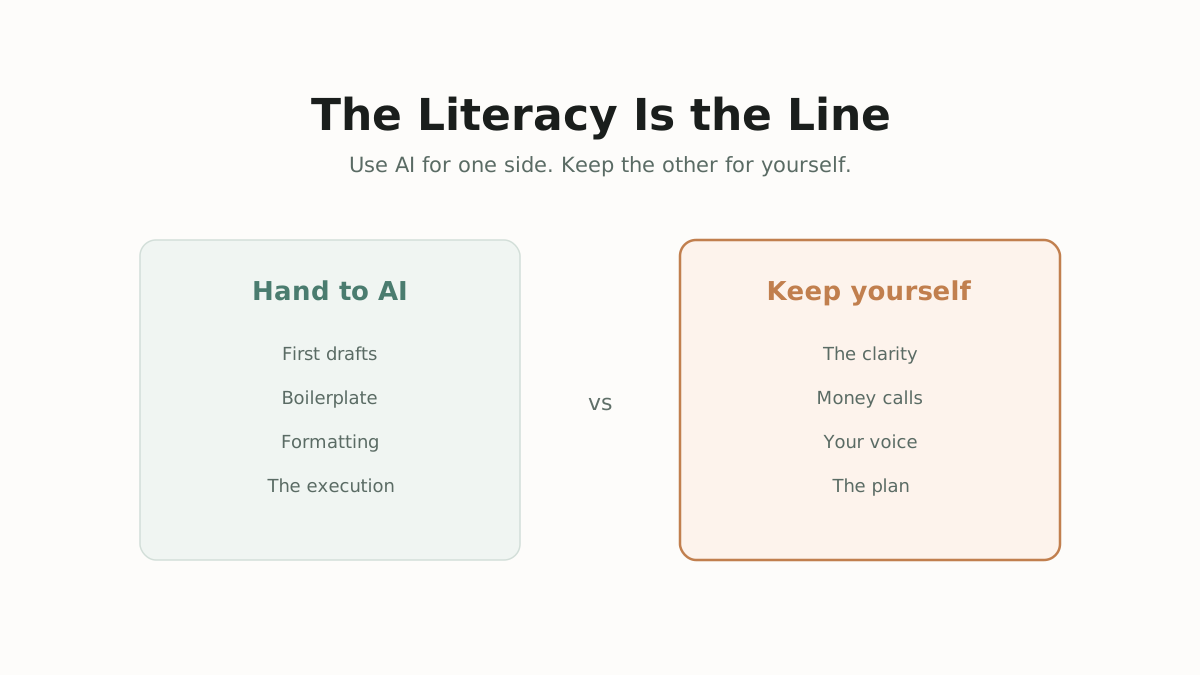
There’s a lot of noise about “AI productivity.” Most of it is people selling courses. Here’s the short list of what actually moves the needle at work, stripped of the hype. Notice the pattern: every single one is “use AI for this, but keep this for yourself.” That pattern is the literacy.
1. Prompting is just thinking out loud. A good prompt is a clear thought. If you can’t explain what you want to a smart intern, the AI can’t read your mind either. Use it to turn a clear ask into fast output. Don’t outsource the clarity itself. Vague in, vague out. The prompt is where your thinking has to happen first, not after.
2. Manage the context. The model only knows what’s in front of it right now. So paste the doc. Paste the examples of what good looks like. Spell out the constraints. Give it the “before you showed up” that it’s missing. Use it to process whatever you feed it. Don’t outsource the decision of what’s relevant to feed it. That judgment is yours.
3. Verify what you can’t otherwise trust. Only lean on AI for tasks you’re able to check. There’s a simple test for this, sometimes called the best-available-human test: would you trust this output more than you’d trust a competent person doing it? You can only answer that on work you understand. Use it to draft, calculate, and propose. Don’t outsource your judgment on anything you can’t actually evaluate. If you can’t tell whether the output is right, the AI isn’t an asset, it’s a liability with good grammar.
4. Automate the right things. Automate the repetitive, the formatting, the rough first draft, the boilerplate. Don’t automate the relationship, the judgment call, the thing that actually is your job. Don’t outsource the part people are paying you for. If you hand over the only thing that makes you valuable, you’ve automated yourself, not your busywork.
5. Stay the director. The model that works is what Ethan Mollick calls the centaur: a clear division of labor where you do strategy and direction and AI does execution. The failure mode is the person who hands everything over and ends up with neither the skill nor the fluency. Use it to execute your plan. Don’t outsource the plan. You stay the one pointing.
6. Refuse to ship slop. AI makes everyone’s individual output better and everyone’s collective output more identical. If everything you publish sounds like everyone else’s default AI, you’ve added nothing to the pile. Use it to get to a draft fast. Don’t outsource your voice, your taste, the last 20% that makes the thing recognizably yours. That last 20% is the whole job now. (This is the same muscle as your soft skills at work: the human edge is judgment and voice, not raw production.)
This whole section is guardrails by design, so let me name the trap it’s all protecting against. The dose curve is real. There’s research out of Microsoft showing that on a big chunk of tasks, people using AI reported doing essentially no critical thinking at all. Moderate, deliberate use sharpens you. Heavy, thoughtless use hollows you out. The tool is fine. The autopilot is the danger. (I wrote a whole piece on that autopilot pattern: you’re not stuck, you’re running someone else’s software.)
AI at work isn’t about doing less thinking. It’s about doing your thinking on the things that actually matter and letting the machine handle the rest.
What “skills” are, and which ones to actually reach for
At some point you’ll hear about “skills,” “agents,” “MCP,” and a dozen other words that sound like they need a certification. They don’t. Here’s the plain version.
A skill is a reusable instruction packet you teach an AI once so it does a job your way, every time, without you re-explaining. Think of it like saving a recipe instead of describing the dish from scratch every dinner. Some you write yourself: here’s how I like my emails, here’s my code style, here’s my brand voice. Some come pre-built. Either way, the deal is the same: teach once, reuse forever.
An agent is just a skill plus tools plus autonomy. It can take multi-step action on its own instead of only answering. That’s the whole vocabulary. Everything else is branding.
Now, which kinds to reach for, kept at the level of category so this doesn’t go stale the moment a product gets renamed.
When you’re building agents
This is an AI that does multi-step work without you babysitting each step.
- A clear instruction or persona skill that defines what it is and, more importantly, what it must never do. The guardrails come first, not last.
- Tool and action access, connecting it to your calendar, email, files, or a database, so it can actually do things instead of just talking about them.
- Memory and context skills so it remembers across runs and doesn’t start from zero every time.
- A human-in-the-loop checkpoint so the agent proposes and you approve the consequential moves.
The guardrail here is non-negotiable: never give an unsupervised agent the keys to anything you can’t afford to have it get wrong. Approval gates on anything that spends money, sends a message to a human, or deletes data. The more autonomy you hand over, the more guardrails you add, not fewer.
When you’re vibe coding
This is building software by describing what you want instead of hand-writing every line.
- A scaffolding or project-setup skill so you start from a clean, sane structure.
- Framework best-practice skills so it writes idiomatic code instead of slop that technically runs.
- A testing and verification skill so you can confirm the thing works without reading every line.
- A security and secrets skill so you don’t accidentally leak an API key into a public repo. This matters more than beginners think.
The guardrail: you don’t have to write every line, but you do have to understand what got built well enough to own it. I’ve shipped weekend toys I couldn’t fully read line by line, and that’s fine for a toy. It’s dangerous for anything real that touches money or other people’s data. Know which one you’re making before you start.
When you’re doing day-to-day work
- A personal voice or brand skill so its writing sounds like you, not like everyone’s default AI.
- Document-handling skills to summarize, extract, and reformat.
- Research and synthesis skills to gather and structure information, after which you draw the conclusion.
- Recurring-task templates for the weekly report, the meeting prep, the email you send in some form every Monday.
The guardrail: skills make you faster at things you already understand. They’re an accelerant, not a substitute for knowing your job.
Skills are how you stop repeating yourself to a machine. But the machine still needs someone who knows what “good” looks like. That someone is you.
Prompting is thinking (which is why it’s worth learning)
Here’s the part that surprised me. Getting good at prompting didn’t make me better at AI. It made me better at thinking.
Because a vague prompt is a vague thought wearing a costume. The moment you have to write down exactly what you want, you find out how fuzzy your idea actually was. You sit there trying to describe the thing, and you realize you don’t fully know what the thing is. That’s not the AI failing you. That’s the AI showing you where your own thinking was soft.
So forget the lists of magic phrases. The best prompters aren’t memorizing incantations. They’re thinking clearly and saying it plainly. Paul Graham has this idea about a coming split between the “writes and write-nots,” people who can still think on paper and people who’ve quietly lost the muscle. Prompting is reps for exactly that muscle. Every clear prompt is a small act of clear thinking, and clear thinking is the thing getting rare.
This connects to something I’ve written about before: the gap between what you can recognize and what you can produce, and how skipping the foundations makes you slower, not faster. AI doesn’t erase that gap. It makes the foundations matter more, because now everyone has the same production engine and the only edge left is knowing what to ask it for.
The guardrail is about order of operations. Use AI to sharpen your thinking, not to skip it. The person who forms a rough take first and then opens the chat is learning. The person who opens the chat first and lets it think for them never gets the reps. Form your own messy opinion before you ask. It can be wrong. It just has to be yours first.
AI doesn’t reward clever prompts. It rewards clear ones. The wand was never the skill. Knowing what to cast was. That part’s still on you.
The guardrails: the things you keep for yourself
Everything in this guide so far has been “use AI for this.” This section is the other half. The line you don’t cross. Because the people who lose to AI aren’t the ones who refuse to use it. They’re the ones who hand it the parts that were supposed to make them them.
Here’s the short list. Not all ten things I could name, because that’s a wall nobody remembers. Just the six that stick.
1. Writing you do to think. Outsource the memo. Keep the journaling. Some writing exists to communicate, and AI is great at that. Other writing exists to figure out what you actually believe, and that one is reps for your brain. Hand it over and you skip the workout.
2. Decisions you can’t verify. Back to the expertise threshold. If you can’t check it, you can’t trust it, and you definitely shouldn’t act on it. The danger zone is the topic where you don’t know enough to catch the confident mistake.
3. Money calls. This is the financial firewall, and I mean it literally. Use AI to learn finance: explain a concept, run the math on a scenario you set up, help you understand your own statement. Never use it to make the call. These models have a meaningful error rate on complex financial scenarios and zero fiduciary duty to you. The reasoning behind keeping this human is the whole point of Psychology of Money: money decisions are about your behavior and your specific life, not a generic optimum.
4. Skill maintenance. Do the important thing without AI sometimes, on purpose. Like a pilot who still practices manual landings even though autopilot can do it. The skill you never use without assistance is the skill you’re slowly losing.
5. Meaning. If the struggle is the point, removing the struggle removes the point. The hard conversation. The craft you’re trying to master. The relationship you’re trying to build. AI can draft the words but it can’t have the experience for you, and the experience was the thing you wanted.
6. Your voice and taste. The last 20%, again, because it’s the one that decides everything. When everyone has the same tools and the same default output, the only differentiator left is the part that’s unmistakably yours. The homogenization is coming for everyone who lets it. Don’t be a sample.
The deeper risk under all six is what researchers call the deskilling paradox: the more AI does for you, the less capable you become without it. Think of it like an e-bike. It’ll take you twice as far with half the effort, which is great. But if you never actually pedal, your legs forget how, and one day the battery’s dead and so are you. The point of an e-bike was never to stop pedaling. It was to go further while you pedal. (This is the cognitive fitness argument Deep Work makes, just with a new threat to the muscle.)
So no, the guardrails aren’t about using AI less. They’re about staying the kind of person who’s worth multiplying.
AI is the sword. Don’t put down your own arm.
How to keep up without losing your mind
The field moves fast enough to make anyone feel behind. So let me save you the anxiety: you don’t keep up by reading everything. You keep up by building a tiny system and then ignoring most of the noise.
Pick two or three trusted signal sources and mute the rest. Most “AI news” is noise dressed as urgency. Find a couple of people or feeds that actually filter for you, and let everything else wash past. You will miss things. None of them will matter.
Learn by using, not by watching. One real project teaches you more than fifty demo videos. The demos are designed to impress you. Your own project is designed to actually work, which is where the real learning hides. (This is just a growth mindset applied to a fast field: you get good by doing the reps, not by watching other people do them.)
Re-run your test set when something big ships. That’s your entire obligation to “the news.” Not reading the thread. Not watching the keynote. Fifteen minutes with your five prompts, and you have a real answer instead of a vibe.
Invest in what compounds, ignore what decays. Clear thinking, verification, taste: those compound for the rest of your life. This week’s specific prompt hack: that decays before the month is out. Spend your attention on the durable stuff.
The frame that keeps me sane is an old Stoic one, the dichotomy of control. You can’t control how fast AI moves. You can control your curiosity, your system, and whether you stay grounded while the threads lose their minds. Seneca said we suffer more in imagination than in reality, and most of the AI anxiety I see is pure imagination. The window is real. The panic is optional. Pick the window.
Nobody is caught up. The whole field is improvising. Improvise with them.
Start here this week
Enough reading. Here’s the on-ramp. No course, no certification, no setup. Every step uses something you can already judge, so you build the skill and keep your judgment sharp at the same time.
1. Pick one AI and bring it one real problem from this actual week. Not a test question. A real email, a real doc, a real decision you’d be doing anyway. Ten minutes, today. Start where you’re already the expert so you can tell whether it helped.
2. Notice what it got wrong and tell it. “No, more like this.” “Shorter.” “You missed the point, here’s the context.” This back-and-forth is the skill. You’re learning to direct, not to receive.
3. Build your five-prompt test set and run it on a different model. Write down five prompts that represent your real work (the checklist is right below). Run them on a second model. Now you’ve felt the leapfrog with your own hands, and you’ll never blindly trust a leaderboard again.
4. Save one skill. Teach it your email voice, or your report format, or your one repeating task. Then reuse it twice this week and feel the thing compound. That feeling is the whole game.
5. Pick your one guardrail. Choose the thing you will not outsource (your journaling, your money calls, your craft) and write it down somewhere you’ll see it. That line is what keeps you the knight instead of the guy who handed over his sword arm.
That’s the whole on-ramp. One real problem, this week. You’ll be the “AI person” in your circle within a month, and you’ll be quietly stunned at how low the bar was. If you want a softer entry point, the interactive tools I built (a memory dividend calculator and a wisdom collection) were all made with the exact tools in this guide. Proof that a curious non-engineer can ship.
Build your personal AI test set (do this once)
Write down five prompts that represent the work you actually do. Keep them in a note. These are your benchmark forever. Aim for one in each category that matters to you:
- A reasoning prompt. A real problem from your work that needs logic, not lookup. “Here’s my situation, what are the tradeoffs?”
- A writing prompt. Something in your voice and your domain. “Draft this in my tone.” Then judge: does it sound human, or like AI slop?
- A “your domain” prompt. Something only you can grade because it’s your field. A nurse asks a clinical reasoning question. A marketer asks for a positioning angle.
- A trap prompt. A question with a tempting wrong answer, or one where you already know the right answer and these models often blow it. Catches confident nonsense.
- A long-context prompt. Paste a long document and ask it to use all of it, not just the start. Tests whether it actually reads or just skims.
Run the same five on any new model (fifteen minutes)
Score each one, fast and honest:
- Did it get it correct, or just right-sounding? (Use prompts where you can actually tell.)
- Did it follow your instructions on length, format, tone, and constraints? Or did it do its own thing?
- Does the writing sound like a human, ideally like you, or like default AI?
- Did it stay grounded, or make things up? Watch the trap and long-context prompts especially.
- Did it use the whole context you gave it, or forget the middle?
- Feel: is it pleasant and fast to work with, or do you fight it the whole way? This matters more than benchmarks admit.
Then decide
- Better on the prompts you care about? Switch, or add it to your rotation.
- Worse? Stay put. Re-test on the next big release.
- Different strengths? Use the right one per job. One for writing, one for code, one embedded in the tools you already live in.
And the four rules that keep this evergreen: re-run it whenever something big ships (that’s your only obligation to AI news), trust your eval over the leaderboard, trust your eval over your first impression, and never marry one model. Keep two or three tabs open. Loyalty is a tax paid in worse output.
Reviews expire in a month. Your test set never does.
The tools will keep changing. There’ll be a new “best” model by the time you finish reading this, and another one after that, and the threads will lose their minds about each one.
None of it changes the actual job. Bring the judgment. Keep the taste. Pedal the bike. Let the machine handle the parts that were never the point, and guard the parts that were. If you want the deeper version of why judgment becomes the scarce input when everyone gets infinite leverage, that’s the whole argument in the Almanack of Naval Ravikant, and it maps cleanly onto the three things I think actually matter: your mind, your direction, your wealth. AI accelerates all three. It replaces none of them.
You got handed a sword that most people are still afraid to pick up. The ones who win this aren’t the smartest. They’re the ones curious enough to swing it this week.
So go swing it.